
Lior Messer
New member
Hi there. I have used xCrud 1.6 quite extensively and am migrating to 1.7.31. I have found an issue with xcrud->button() when using a condition to display (or not) the button
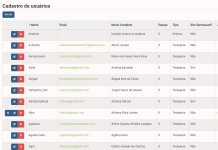
In xCrud 1.6, this is how the screen looks like. Notice that the "G" button only shows in row 8:
Here is a print of my code. This button has a condition where it should only show if the 'calendarid' field is not null

Now here is a print of the screen with xCrud 1.7.31:
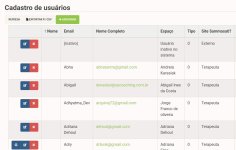
Please notice that now there is an empty column (the second one) and the headers are offset with the rows. The header of the second column ('Nome') corresponds to the content in third column. The header of the third column ('Email') corresponds to the content in the fourth column. As so on, with all headers/contents..
My workaround so far it not to use conditions on buttons, which is not the best approach.
Any ideas?
In xCrud 1.6, this is how the screen looks like. Notice that the "G" button only shows in row 8:
Here is a print of my code. This button has a condition where it should only show if the 'calendarid' field is not null
Now here is a print of the screen with xCrud 1.7.31:
Please notice that now there is an empty column (the second one) and the headers are offset with the rows. The header of the second column ('Nome') corresponds to the content in third column. The header of the third column ('Email') corresponds to the content in the fourth column. As so on, with all headers/contents..
My workaround so far it not to use conditions on buttons, which is not the best approach.
Any ideas?