
pierluisdj
New member
The table in the example is incorrect!
SOLUTION
fill the table with correct icons code (example: fas fa-circle ... find on google for more code)
this is a short list of icons code... truncate your icons table then execute this query:
INSERT INTO `icons` (`icons_id`, `icon`) VALUES
(14, 'far fa-circle'),
(15, 'fas fa-edit'),
(16, 'fas fa-table'),
(17, 'fas fa-copy'),
(18, 'fas fa-th'),
(19, 'fas fa-tachometer-alt'),
(20, 'far fa-calendar-alt'),
(21, 'fas fa-book'),
(22, 'fas fa-file'),
(23, 'far fa-circle text-danger'),
(24, 'far fa-circle text-info'),
(25, 'far fa-circle text-warning'),
(26, 'fa fa-briefcase'),
(27, 'fa fa-users'),
(28, 'fa fa-user'),
(29, 'fas fa-ellipsis-h'),
(30, 'far fa-envelope'),
(31, 'fas fa-circle');
Then you can go to menu manage page and replace all "icons" one by one.
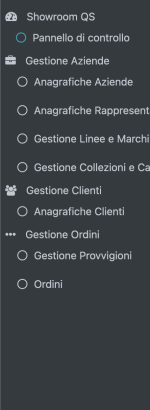
this is a preview of my menu
SOLUTION
fill the table with correct icons code (example: fas fa-circle ... find on google for more code)
this is a short list of icons code... truncate your icons table then execute this query:
INSERT INTO `icons` (`icons_id`, `icon`) VALUES
(14, 'far fa-circle'),
(15, 'fas fa-edit'),
(16, 'fas fa-table'),
(17, 'fas fa-copy'),
(18, 'fas fa-th'),
(19, 'fas fa-tachometer-alt'),
(20, 'far fa-calendar-alt'),
(21, 'fas fa-book'),
(22, 'fas fa-file'),
(23, 'far fa-circle text-danger'),
(24, 'far fa-circle text-info'),
(25, 'far fa-circle text-warning'),
(26, 'fa fa-briefcase'),
(27, 'fa fa-users'),
(28, 'fa fa-user'),
(29, 'fas fa-ellipsis-h'),
(30, 'far fa-envelope'),
(31, 'fas fa-circle');
Then you can go to menu manage page and replace all "icons" one by one.
this is a preview of my menu